Rejections
A rejection records that a vessel was rejected by an entity (for example a charterer or terminal), for a stated reason. The Rejections page (sidebar → Vessel Management → Rejections) lists rejections and lets you create and manage them.
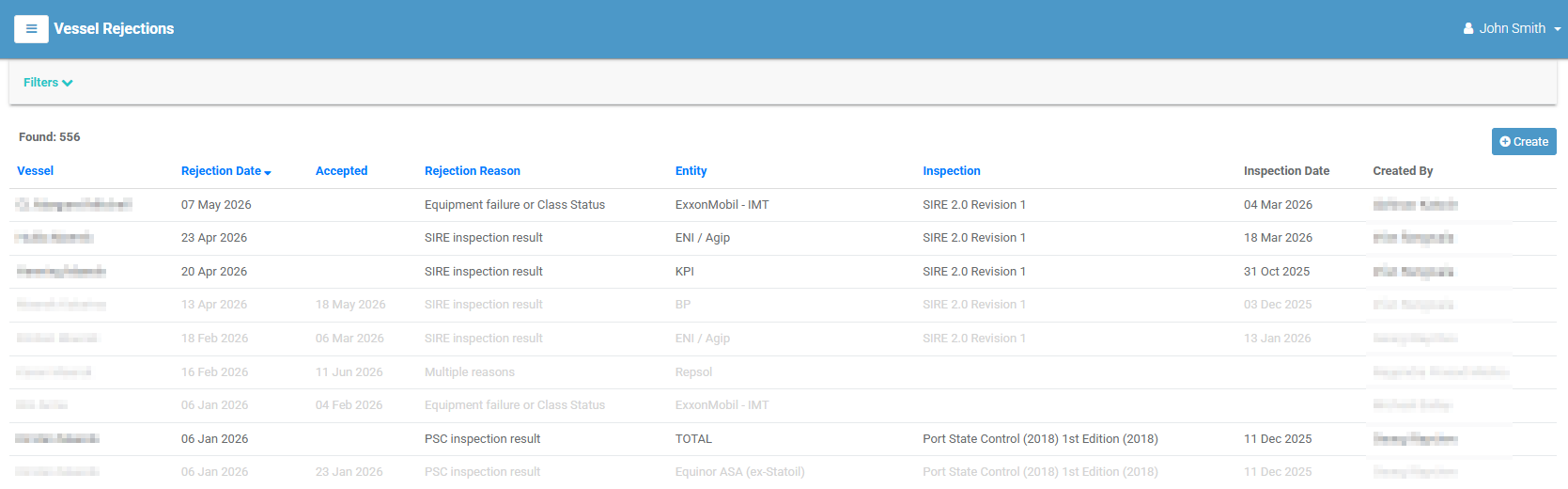
The rejections list
Each row is a rejection; select it to open its detail page. Rejections that have been accepted (resolved) are shown greyed out. Columns:
| Column | Meaning |
|---|---|
| Vessel | The vessel that was rejected. |
| Rejection Date | When the rejection was raised. |
| Accepted | The date it was accepted/resolved (blank if still active). |
| Rejection Reason | The reason recorded. |
| Entity | The entity that rejected the vessel. |
| Inspection | The related inspection, if any. |
| Inspection Date | The date of that inspection. |
| Created By | Who recorded the rejection. |
Select a column heading to sort.
Filtering
Select Filters to narrow the list by Vessels, Rejection Reasons, Entities, Period, or the Active Rejections Only toggle. Select [ Clear All ] to reset.
Creating a rejection
- Select Create (top-right). (Requires the create permission.)
-
Complete the form. Required fields are marked:
Field Required Notes Vessel ✔ The vessel being rejected. Entity ✔ The entity raising the rejection. Rejection Reason ✔ From the Rejection Reason master list. Rejection Date ✔ When the rejection occurred. Inspection A related inspection (available once a vessel is chosen). Details ✔ A description of the rejection. -
Select Create. Select Cancel to discard.
An email is sent on creation
When you create a rejection, VIMS automatically sends a notification email to management.
The rejection detail page
Opening a rejection shows its details — vessel, entity, rejection reason, who raised it, rejection date, accept date, the related inspection and its date, and the full details text.
The Tasks menu offers Modify and Delete (each subject to permission).
To mark a rejection as resolved, open Tasks → Modify and set the Accept Date.
Tabs
| Tab | Contents |
|---|---|
| Comments | Discussion on the rejection — see Comments. |
| Files | Attachments — see Attachments. |