Inspector Management
The Inspector Management page (sidebar → Administration → Inspector Management) maintains the list of inspectors — the people who carry out inspections and can be selected as the inspector on an inspection.
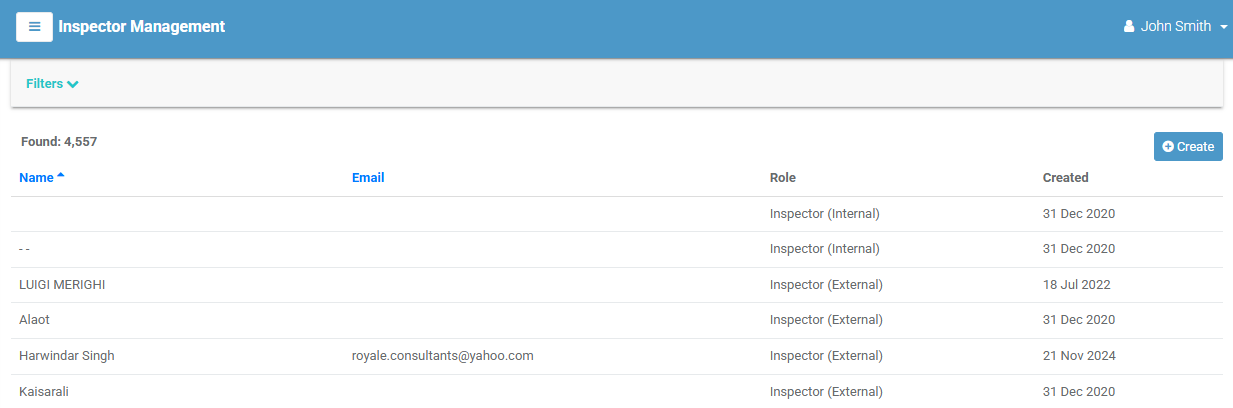
The inspector list
Each row is an inspector; select it to open their detail page. Columns:
| Column | Meaning |
|---|---|
| Name | The inspector's full name. |
| Their email address. | |
| Role | Their assigned role. |
| Created | When the record was created. |
Filtering
Select Filters to narrow by Inspector's Name, Email, or Role. Select [ Clear All ] to reset.
Creating an inspector
- Select Create (top-right). (Requires the create permission.)
- Complete the form — First Name, Last Name, Email, and Role are all required.
- Select Create. Select Cancel to discard.
Editing an inspector
Open the inspector and use the Tasks menu to Modify or Delete the record (subject to permission).
Inspectors vs users
Inspectors are managed separately from sign-in users. You can also create a new inspector on the fly while creating an inspection, using the + icon next to the Inspector field — see Creating an inspection.