Planning
The Planning page (sidebar → Inspection Management → Planning) is a forward-looking view of your vessels and when their next inspections are due. Use it to see, at a glance, which vessels are approaching or past their due dates so you can plan upcoming inspections.
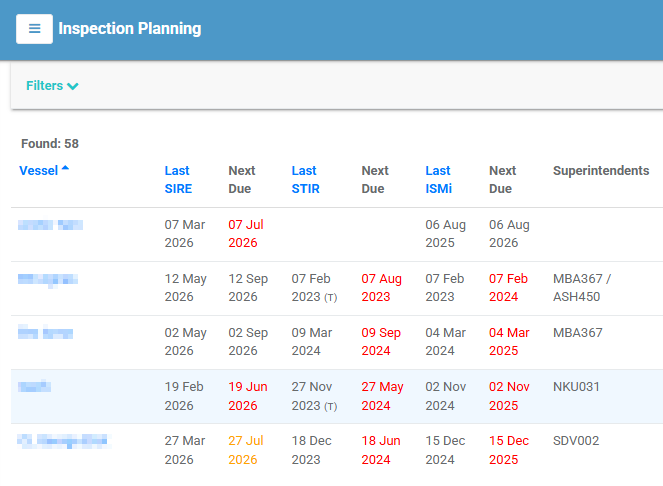
The planning table
Each row is a vessel. Found: n shows how many vessels match your filters.
| Column | Meaning |
|---|---|
| Vessel | The vessel. Select it to open the vessel's detail page. |
| Last SIRE / Next Due | Date of the last SIRE inspection and when the next one is due. |
| Last STIR / Next Due | Date of the last STIR inspection and when the next one is due. |
| Last ISMi / Next Due | Date of the last ISMi inspection and when the next one is due. |
| Superintendents | The vessel's Marine and Technical Superintendents. |
| Remarks | Internal and external remarks recorded for the vessel. |
| Active Rejects | The number of active rejections against the vessel. |
Next Due dates are highlighted as they approach or pass their due date, so overdue vessels stand out.
Select a column heading (where sorting is available) to sort the table.
Filtering
Select Filters to narrow the list by Vessels, Vessel Type, Fleet Group, or Companies. Select [ Clear All ] to reset.
Updating vessel planning information
Select a vessel row to open the Update Vessel Info window, where you can adjust the planning details for that vessel:
| Field | Purpose |
|---|---|
| Marine Superintendent | The user responsible as Marine Superintendent. |
| Technical Superintendent | The user responsible as Technical Superintendent. |
| Internal Remarks | Notes for internal use. |
| External Remarks | Notes that may be shared externally. |
Select Update to save your changes, or Cancel to close without saving.
Note
Superintendents and remarks set here also appear on the vessel's record in Vessel Management.