Master Tables
The Master Tables page (sidebar → Administration → Master Tables) is where you maintain the shared reference lists that appear in drop-downs throughout VIMS. Keeping these lists tidy keeps data consistent everywhere they are used.
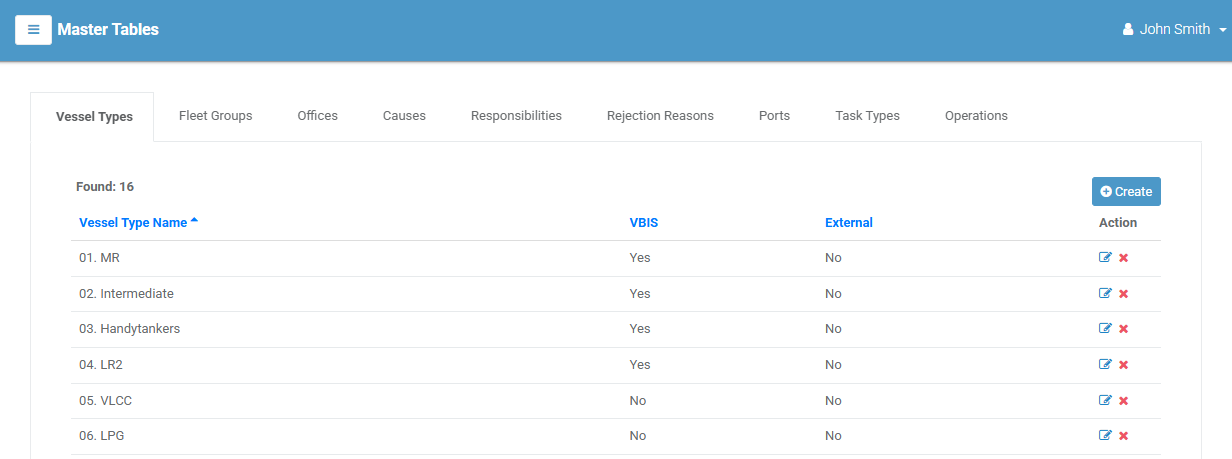
The reference lists
The page has a tab for each list:
| Tab | Used for |
|---|---|
| Vessel Type | Types of vessel (used on vessels and filters). |
| Fleet Group | Fleet groupings for vessels. |
| Office | Offices that users belong to. |
| Cause | Causes recorded on observations. |
| Responsibility | Responsible parties recorded on observations. |
| Rejection Reason | Reasons used when recording a rejection. |
| Port | Ports used on inspections. |
| Task Type | Types used in the Task Scheduler. |
| Operation | Vessel operations selected on inspections. |
Adding, editing, and deleting entries
Every tab works the same way:
- Select a tab to see its list. Found: n shows how many entries it has.
- Select Create to add an entry. A small window opens — type the name and select Create.
- To change an entry, select its edit (✏️) icon, update it, and save.
- To remove an entry, select its delete (❌) icon.
(Create, edit, and delete each depend on your permissions for that list.)
Warning
A reference entry that is already in use by inspections, vessels, or observations may not be removable. If a delete is blocked, that entry is in use somewhere.