Filters & Search
Most list pages in VIMS — Inspections, Observations, Vessels, Rejections, Users, and more — share the same tools for narrowing down, sorting, and paging through records. Learn them once and they work everywhere.
The Filters panel
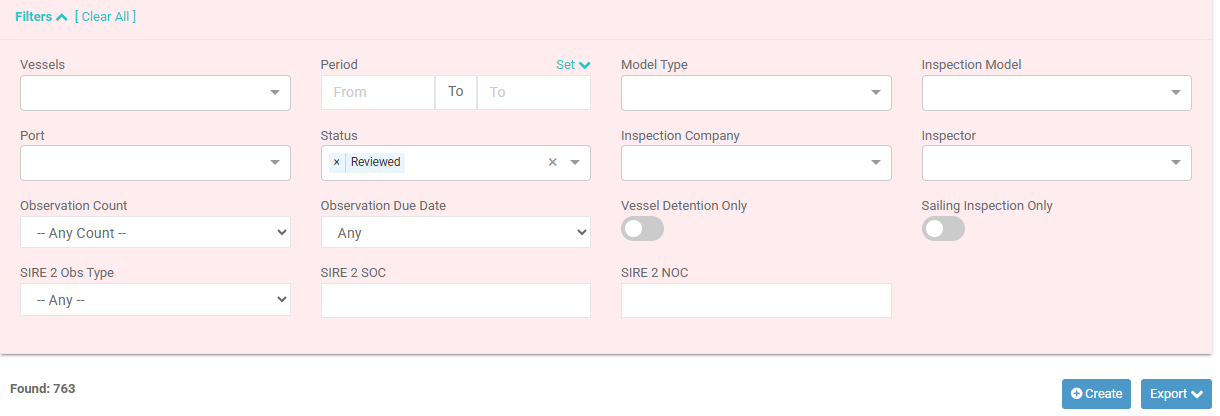
- Select Filters to expand or collapse the panel.
- Filters apply as you set them — the list refreshes automatically, and Found: n shows how many records match.
- Select [ Clear All ] to remove every filter at once.
Common filter types you'll see:
| Filter type | How to use it |
|---|---|
| Text box | Type part of a name, number, or word — the list filters as you type. |
| Multi-select | Tick one or more options (vessels, companies, statuses, etc.). |
| Period / date range | Set a From and To date, or pick a quick preset from Set. |
| Toggle | Switch an option on or off (for example "Active Only"). |
Sorting
On most tables, select a column heading to sort by it. Select the same heading again to reverse the order (an arrow shows the current direction).
Rows per page and paging
- Use Rows Per Page to show 10, 20, 50, or 100 records at a time.
- When there is more than one page, use the page controls to move between pages.
Exporting
Where a list supports it, an Export button lets you download the current (filtered) results as PDF or Excel — handy for reporting or sharing outside VIMS.
Tip
Filters, sorting, and export work together: filter and sort the list to exactly what you want, then export just those rows.