Entity Management
An entity is an organisation involved in inspections. VIMS groups entities into three types:
- Inspection Company — companies that carry out inspections.
- Ship Owner — owners of vessels.
- Technical Operator — technical operators of vessels.
The Entity Management page (sidebar → Administration → Entity Management) lists entities and lets you create and maintain them.
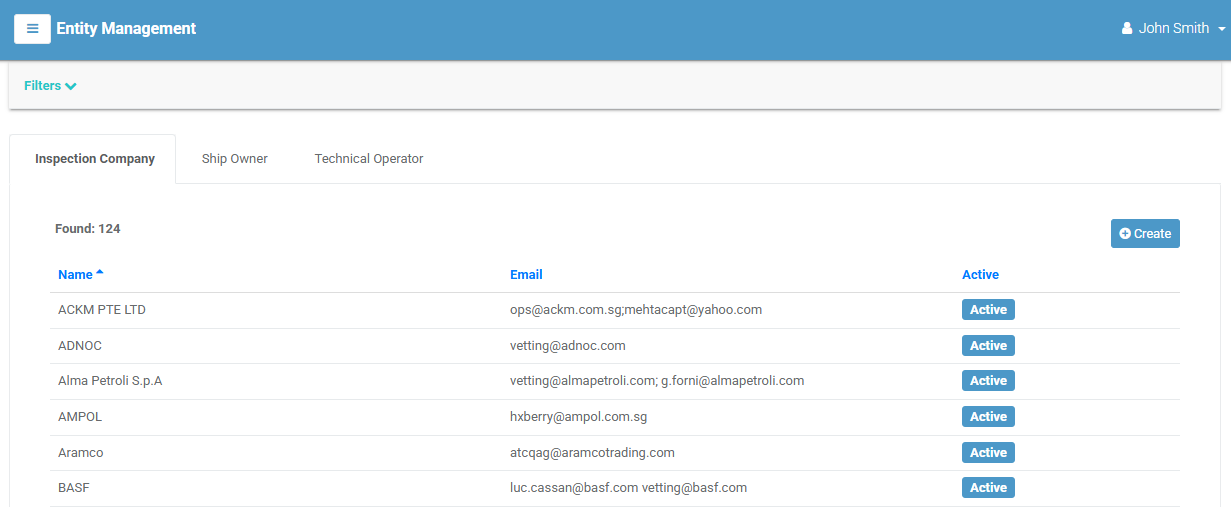
The entity list
The page has a tab for each entity type (Inspection Company, Ship Owner, Technical Operator). Select a tab to list entities of that type. Each row shows the entity's Name, Email, and status (Active or Locked). Select a row to open its detail page.
Filtering
Select Filters to narrow by Entity Name, Email, or Tags. Select [ Clear All ] to reset.
Creating an entity
- Select the correct type tab, then select Create. (Requires the create permission.)
-
Complete the form. Required fields are marked:
Field Required Notes Entity Name ✔ The organisation's name. Country ✔ The entity's country. Phone Contact phone. Address Postal address. Contact Person Named contact. Website Web address. Email Contact email. Active Toggle off to deactivate the entity. Comments Rich-text notes. -
Select Create. Select Cancel to discard.
The entity detail page
Opening an entity shows its details — type, email, country, website, contact person, phone, address, status, and comments.
The Tasks menu offers Modify and Delete (each subject to permission).
Tabs
| Tab | Contents |
|---|---|
| Files | Attachments — see Attachments. |
| Inspections | The entity's inspections (shown for Inspection Companies) — see Inspections. |